Breaking Through Air Gaps: How We Built an OCR-Based Data Exfiltration Tool
ReactiveZero delivers advanced penetration testing, red teaming, threat hunting, and digital forensics — led by OSCP, CEH, and CHFI-certified experts. We help organizations neutralize threats across IT, OT, IoT, and cloud environments.
When traditional file transfer methods are locked down, sometimes the answer is literally staring you in the face.
The Problem: Extracting Data from Fortress Environments
Picture this: You're working in a highly secured environment. The network is completely isolated (air-gapped). USB ports are disabled or monitored. Cloud storage is blocked. File transfers are logged and scrutinized. Every digital pathway out is locked down tight.
But you need to extract a file—maybe for legitimate security research, forensic analysis, or red team assessment. How do you do it?
The answer might surprise you: Take a picture of it.
The Solution: Visual Data Transfer via OCR
I built a tool that bridges the physical and digital worlds by using your smartphone camera to capture hex dumps displayed on a screen and automatically reconstruct the original binary files.
The Workflow is Beautifully Simple:
Step 1: Generate the hex dump with a one-liner command:
Step 2: Display it rapidly line by line on screen (I built a Python script that displays 4-20 lines per second)
Step 3: Point your iPhone camera at the terminal
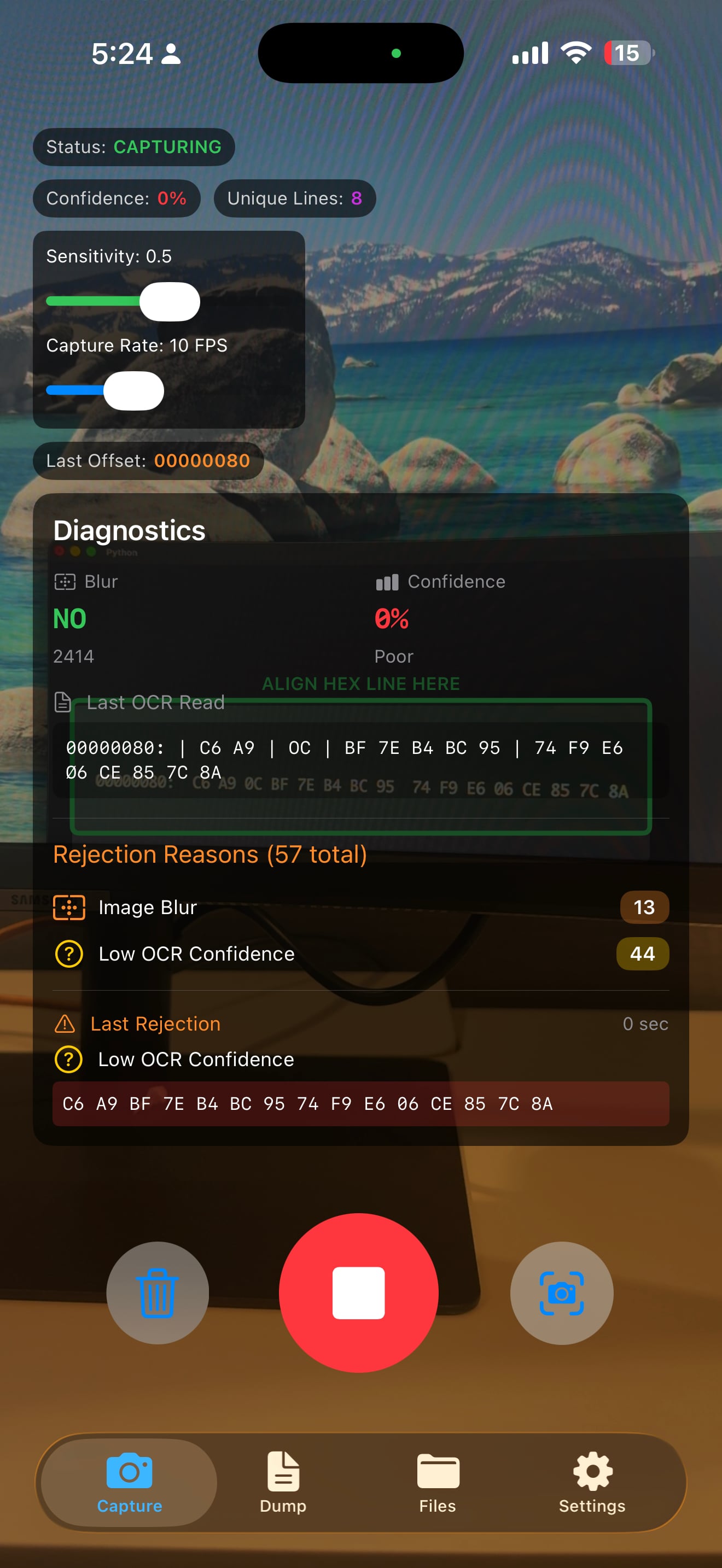
Step 4: Watch the magic happen as the app captures, processes, and reconstructs your file in real-time
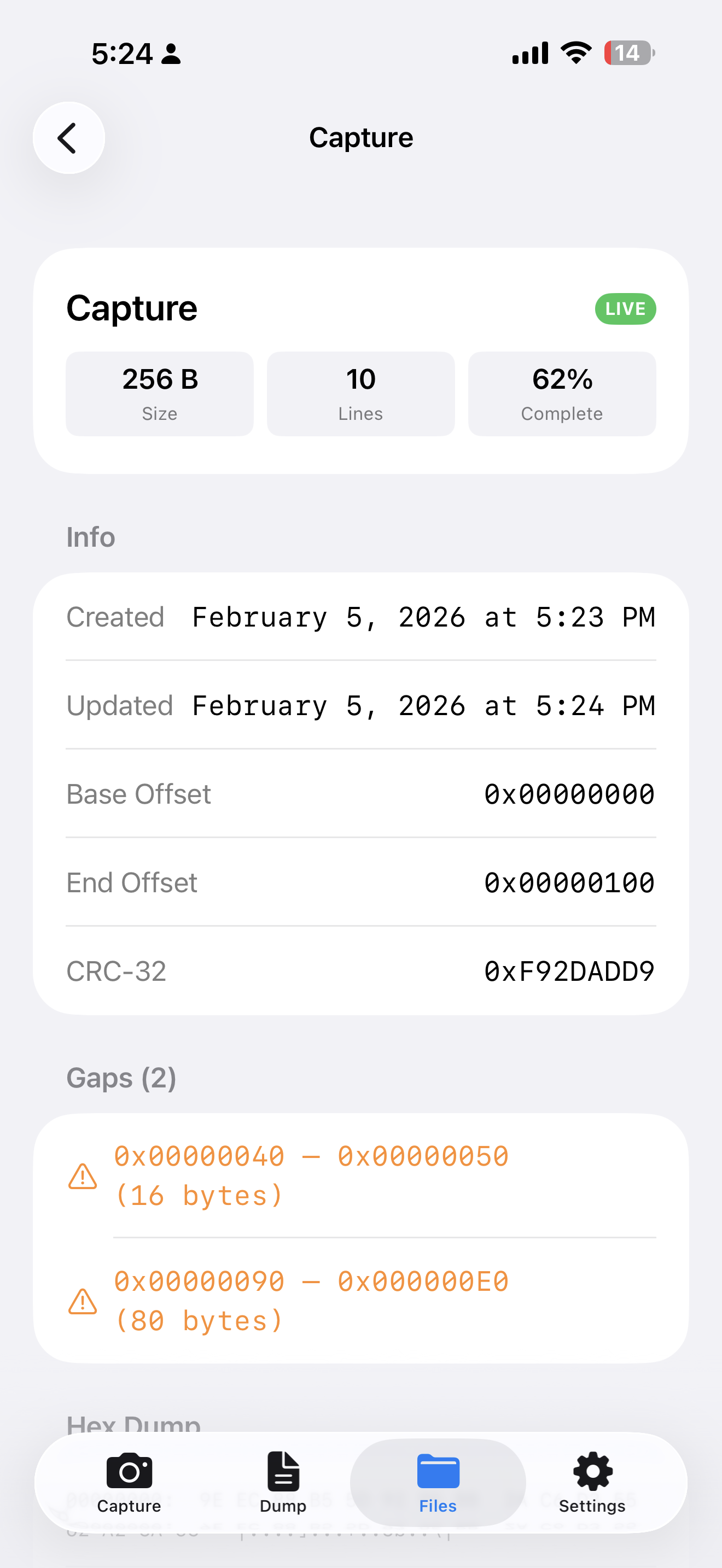
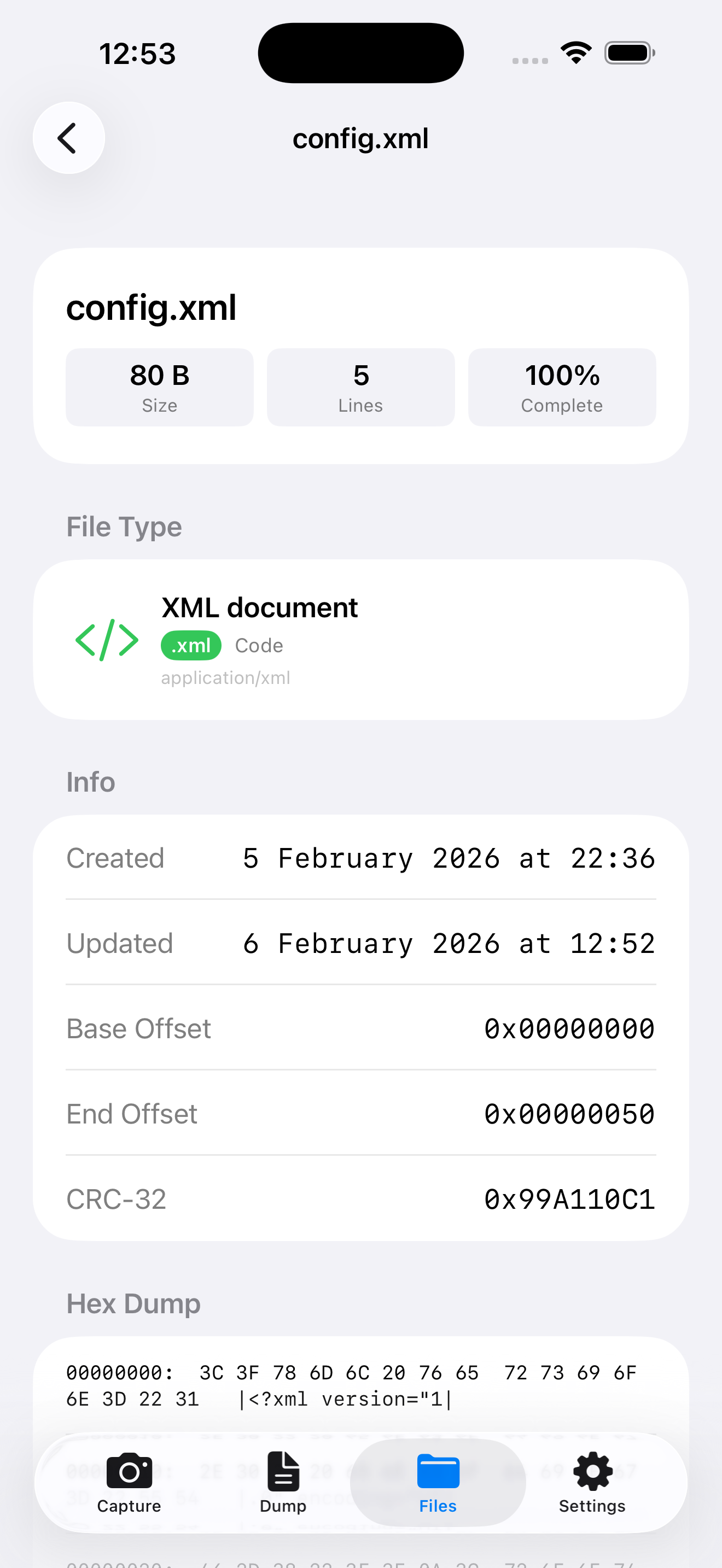
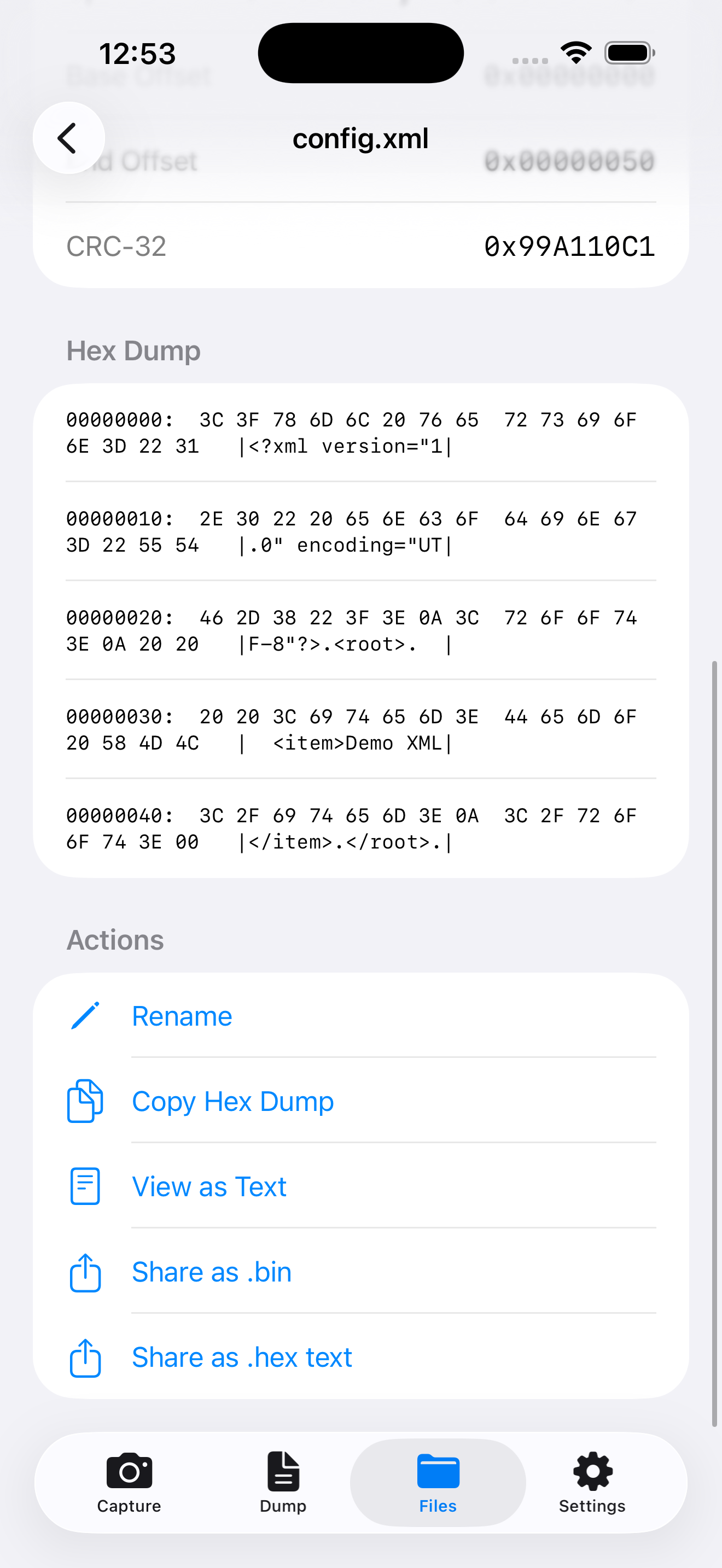
Step 5: Export the reconstructed binary with byte-perfect accuracy
The Technical Challenge
Building this wasn't straightforward. Here are the core challenges I had to solve:
1. OCR Accuracy on Hex Data
Hex dumps contain characters that look similar: 0 vs O, 1 vs I, 8 vs B, S vs 5. I implemented:
• Vision framework integration for iOS text recognition
• Confidence scoring for each captured line
• Pattern validation to reject malformed hex data
• Smart normalization to handle various hex dump formats
2. Out-of-Order Capture
Users don't always capture lines sequentially. The tool handles:
• Offset-based reassembly - lines are sorted by their memory address
• Deduplication - if you capture the same line twice, it keeps the highest-confidence version
• Gap detection - identifies missing byte ranges
• Real-time progress tracking - visual indicators show completeness percentage
3. File Type Detection
Once bytes are captured, what kind of file is it? I built a comprehensive signature detection system:
• 100+ file type signatures including images (PNG, JPEG, GIF), documents (PDF, RTF), archives (ZIP, TAR, RAR), executables (ELF, PE, Mach-O), databases, certificates, ROMs, 3D models, and more
• Magic number analysis - examines the first bytes to identify file types
• Automatic extension assignment based on detected type
• Category classification with color-coded visual feedback
4. Data Integrity
How do you ensure the reconstructed file is correct?
• CRC32 checksums for verification
• Gap visualization showing exactly which bytes are missing
• Byte coverage tracking displays what percentage is complete
• Hex dump preview lets you inspect the captured data
Key Features:
📷 OCR-Powered Capture
Point your camera at any terminal or printout showing hex data. The app automatically extracts hex lines with high confidence scoring.
🧩 Intelligent Assembly
Reconstructs complete binary files from multiple captures, handling:
• Out-of-order lines
• Duplicate detection
• Gap filling
• Multiple files simultaneously
🔍 Smart File Detection
Recognizes file types through magic number analysis:
• Images: PNG, JPEG, GIF, BMP, WebP, TIFF, RAW formats
• Documents: PDF, RTF, XML, Office formats
• Archives: ZIP, TAR, GZIP, 7Z, RAR, LZ4
• Media: MP3, MP4, FLAC, MKV, AVI
• Executables: ELF, PE, Mach-O, Java Class, WebAssembly
• Databases: SQLite, Access, MySQL dumps
• Specialized: Certificates (DER, PEM), ROMs (NES, GB), 3D models (STL, OBJ), fonts (TTF, OTF)
📊 Real-Time Progress
• Live file assembly as you capture
• Completeness percentage with circular progress rings
• Gap detection showing missing byte ranges
• Direction detection (scrolling up/down)
💾 Flexible Export
• Share as binary files (preserves exact bytes)
• Export as hex dump text
• View decoded text content
• Copy to clipboard
⚡ High-Speed Capture
The Python display script I built can show hex lines at 4-20 lines per second, making it possible to transfer a 1MB file in under a minute.
Technical Stack
• Platform: iOS (iPhone/iPad)
• Language: Swift with SwiftUI
• OCR Engine: Vision framework
• Architecture: MVVM with Observation framework
• File Detection: Custom signature matching engine
• Display Tool: Python 3 with argument parsing
Real-World Use Cases
- Security Research:
Analyze malware samples from isolated analysis environments without network transfer risks.
- Forensic Investigation
Extract data from screenshots or photographs of hex dumps found during investigations.
- Red Team Operations
Exfiltrate data from restricted environments where all traditional transfer methods are monitored or blocked.
- Legacy System Recovery
Retrieve data from systems with no modern connectivity options—if you can display it, you can capture it.
- Penetration Testing
Demonstrate data exfiltration vectors in security assessments of highly controlled environments.


